
What’s New in iTest 4.5: Smarter Testing, Smoother Workflows
The latest release of iTest 4.5 brings a wave of enhancements aimed at improving the flexibility, usability, and performance of A&D Technology’s test automation and control software. Whether you’re working in automotive, energy, or industrial applications, iTest 4.5 delivers powerful updates to streamline operations across the board. Here’s a summary of what’s new. View full release notes here. Download the latest .exe file on our customer portal and enter your license key. If you need a new license key, contact your account manager.
Modernized Patching Process
The traditional PatchUpdate.exe method has been retired. Instead, you now apply patches using the full setup executable—for example, iTest45Setup.exe. Alongside this, a new voSysPatchStatus channel helps verify if the iTest and LabAgent versions in use are up to date.
New “Headless” Mode
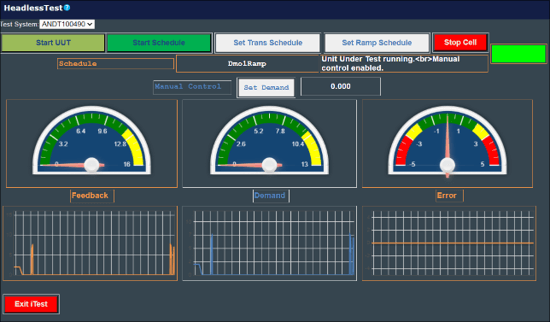
Running iTest without a GUI is now possible thanks to the new “headless” mode. Ideal for lab environments, this allows tests to run in the background while displaying a system tray icon. It integrates seamlessly with LabCentral’s Free-form Dashboards for remote interaction.
AutomationPanel: Major Usability Upgrades
- Saved Configurations: Chart panel setups can now be saved and reused, much like LivePlot templates.
- Data Log Viewer Enhancements: New UI controls let you customize fonts, headers, filters, and more.
- Gauge Panel: Includes an “Error Color” setting for more intuitive visual feedback.
- Indicators: New options show system and process statuses in the status bar.
- Schedule Viewer: Filter schedule files using the new
Schedule File Filterproperty. - Python Script Message Support: Button panels can now pass arguments to Python scripts directly.

SolutionBuilder: Productivity Boosters
- Build Output Bar: Displays errors and highlights affected files in red for faster debugging.
- Editable Channel Picklist: Allows channel selection from pre-defined lists in schedules.
- Layouts Editor: Shows a gray background for panels that won’t fully display—helpful for layout planning.
- Limit Groups Property Sheet Editor: Streamlines batch updates to channel limits.
- Log Order Lists & Lookup Tables Editors: Add powerful editing and search capabilities.
- Reordering Tiles: Rearrange layout tiles via drag-and-drop or keyboard shortcuts.
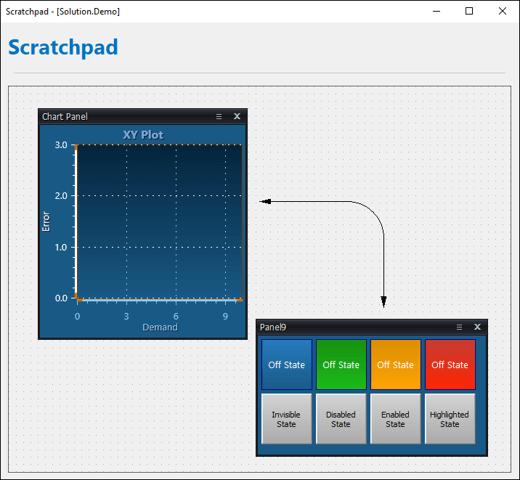
- Scratchpad Feature: Temporarily store and transfer panels between layouts.
Expanded Driver Support
New drivers and updates include:
- New: AC2000Cycler, MelsecDriver, OPC UA, RotoTest.
- Enhanced: AKEngine (higher polling rate), AndBalance (overload monitoring), Chamber (Weiss ASCII 2 support), and more.
- EtherCAT & Modbus: Increased instance support and real-time settings.
- XCPMaster: Adds support for CCP downloads and more robust data decoding.
Python Package Management
iTest now auto-installs missing Python packages from the support directory during startup. New supported packages include pypdf, pdfkit, lxml, pillow, and others—making it easier than ever to integrate custom scripting.
iTest.BTS Updates
- Parameters Editor: New columns for high/low ignore times.
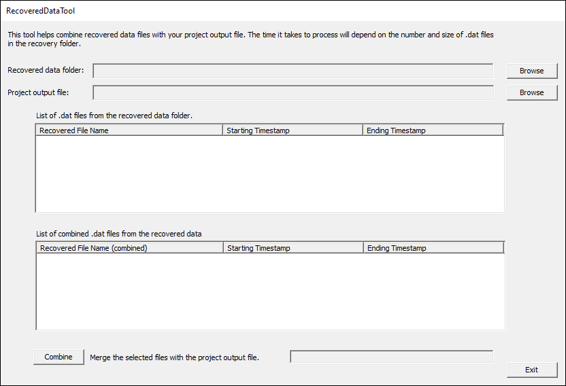
- RecoveredDataTool: Efficiently processes and merges recovered data into logs.
Additional Features
- A new
ArraySumVCL function allows summing a subset of array values. - Several INI settings were added to expand customization and control.
Deprecated Features
- DLBAxisMixEmptyUnits is now handled through a property setting.
- VCL Debugger for Visual Studio Code has been officially deprecated.
iTest to OS Compatibility Matrix
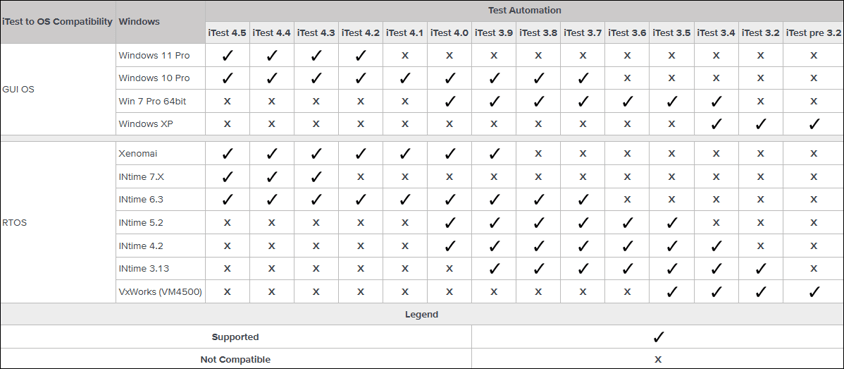
For more compatibility or release information, view the full detailed iTest 4.5 release notes.
Final Thoughts
iTest 4.5 is all about improving performance, streamlining test setup, and giving engineers more control over their testing environments. With more automation, broader compatibility, and a sharper interface, this release ensures iTest continues to be a robust platform for precise and efficient testing.
Want help upgrading or training your team on the new features? Let’s connect.