
iTest 4.6: Smarter Automation, Deeper Insight, and Greater Flexibility for Modern Test Systems
As test environments grow more complex—integrating advanced electronics, software‑defined systems, and global development teams—test automation platforms must evolve just as quickly. The iTest 4.6 release represents a major step forward, introducing powerful new capabilities that help engineers automate more, validate faster, and manage test systems with greater confidence.
From AI‑driven visual validation to expanded Python automation and improved lifecycle control, iTest 4.6 delivers meaningful enhancements across the entire test workflow.
Below is a closer look at what’s new and why it matters for real‑world test applications.
View the full “What’s New in iTest 4.6” Presentation.
View the full “What’s New in iTest 4.6” Presentation.
AI Vision: Automating What Used to Require Human Eyes
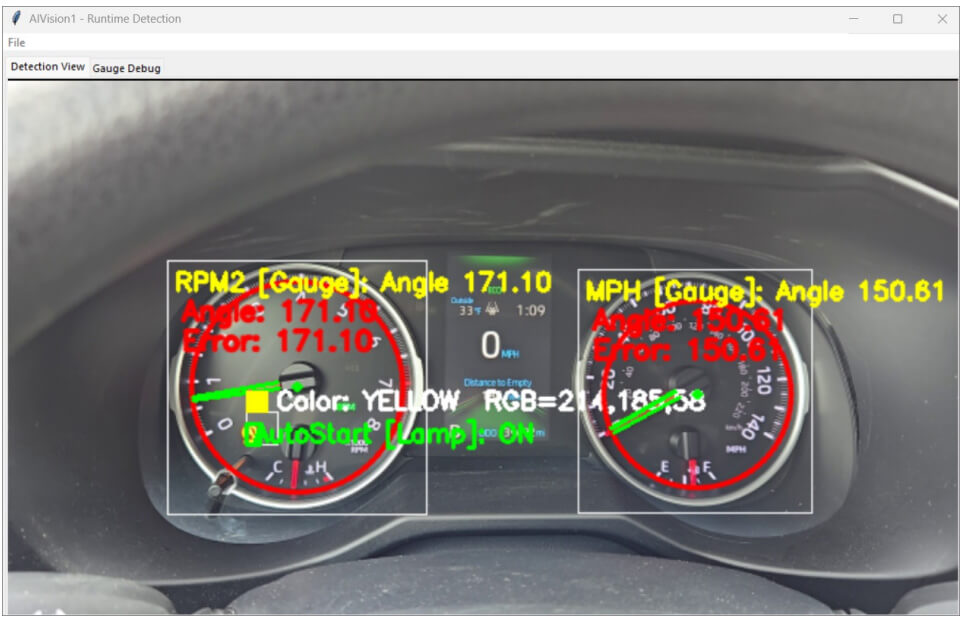
One of the most significant additions in iTest 4.6 is the new AI Vision driver, which brings vision‑based validation directly into the iTest ecosystem. Using live or recorded video input, AI Vision performs real‑time image processing to detect and analyze lamps, gauges, and other visual indicators commonly found in instrument clusters and HMIs.
For test engineers, this means:
- Reduced reliance on manual visual checks
- Fewer custom vision systems and scripts
- More consistent, repeatable validation of visual behaviors
By integrating vision data directly into AutomationPanel workflows, AI Vision enables closed‑loop testing where visual states can trigger actions, alarms, or pass/fail conditions automatically.
French Language Support for Global Test Teams
iTest 4.6 expands global usability with native French GUI support. International teams can now operate iTest in French by simply configuring the system language setting, making it easier to deploy standardized test systems across multinational organizations.
This update supports clearer communication, reduced training friction, and improved productivity for French‑speaking engineers and technicians—especially in collaborative OEM and Tier 1 environments.
Stronger Solution Management and Revision Control
Managing test solutions across development, validation, and production environments is a common challenge. iTest 4.6 introduces enhanced solution revision control, allowing teams to clearly separate development solutions from production‑ready solutions.
With revision control enabled:
- Solutions can be exported, imported, and tracked more reliably
- Teams reduce the risk of unintended changes reaching production systems
- Collaboration across engineering groups becomes more structured and auditable
This capability aligns iTest more closely with modern software lifecycle and configuration management best practices.
Expanded AutomationPanel Capabilities for Smarter Interfaces
The AutomationPanel receives several targeted upgrades in iTest 4.6, giving engineers more control over operator interfaces and automation logic:
- Button Panel enhancements add state threshold logic, enabling buttons to change state based on channel values.
- ComboBox Panels now support additional appearance states, including highlighted and invisible modes.
- Chart Panels gain logarithmic scaling, major and minor grid controls, and new automatable properties—ideal for visualizing wide‑range data such as electrical, thermal, or vibration signals.
- The Property Manager now includes direct help access, improving usability and reducing configuration time.
- The Schedule Viewer Panel can now disable schedule editing, helping protect validated test sequences from accidental changes.
Together, these enhancements make AutomationPanel layouts more powerful, more intuitive, and better suited for production and endurance testing environments.
Driver Enhancements for Improved Connectivity and Feedback
iTest 4.6 includes meaningful driver updates that improve system integration and observability:
- The CANoe driver now supports measurement status feedback and includes a new UDP interface for greater communication flexibility.
- The EtherCAT driver adds byte‑swap support and enables active digital I/O channel definitions, simplifying configuration in complex distributed I/O systems.
These updates help ensure iTest remains adaptable to a wide range of hardware architectures and communication requirements.
A Modernized Python Environment for Advanced Automation
Python continues to play a central role in advanced test automation, and iTest 4.6 significantly expands Python capabilities:
- The platform now runs on Python 3.14
- Engineers can define and access custom Python editors directly from iTest dialogs
- New built‑in Python functions simplify configuration access, messaging, and data exchange
- Real‑time Python calculations on Xenomai allows deterministic calculations to run at defined intervals, supporting advanced control and monitoring strategies
These improvements make Python‑based automation more powerful, more accessible, and more suitable for real‑time test environments.
Introducing iTest “Headless” Mode: Python‑Driven Control Without the Overhead
iTest can now run in headless mode using a simple Python‑based control system, with LabCentral dashboards for monitoring data and operator actions.
This approach enables rapid deployment of lightweight control systems while maintaining full integration with the broader iTest and LabCentral ecosystem.
Built for the Future of Test Automation
With iTest 4.6, A&D Technology continues to modernize the platform—retiring legacy utilities while strengthening compatibility across operating systems, RTOS environments, and hardware platforms. The result is a more capable, more scalable foundation for testing today’s engines, motors, batteries, powertrains, and complex electromechanical systems.
If you have a Safety Belt Software Maintenance Subscription or would like to purchase the upgrade, visit our customer portal to download the latest release file, and contact your account manager to request your new license activation keys.